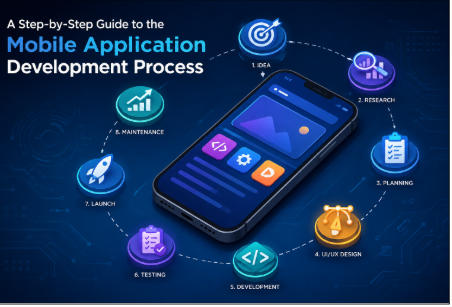
Mobile applications have become an essential part of modern business strategies, helping companies connect with customers, improve internal operations, and deliver convenient digital experiences. From e-commerce and healthcare to finance, education, entertainment, and logistics, businesses across industries are investing in mobile solutions to meet changing customer expectations.
However, building a successful application requires more than just a good idea. A structured development process helps businesses transform an idea into a reliable, scalable, and user-friendly product. Understanding each stage of Mobile Application Development can help businesses make better technology decisions, control costs, and launch products that deliver long-term value.
This guide explains the complete mobile application development process, from initial planning and market research to design, development, testing, deployment, and ongoing maintenance.
What is Mobile Application Development?
Mobile application development is the process of creating software applications specifically designed to run on mobile devices such as smartphones and tablets. Depending on the target audience and business requirements, an application can be developed for platforms such as Android, iOS, or both.
The process typically involves several stages, including idea validation, requirement analysis, UI/UX design, technology selection, development, testing, deployment, and maintenance.
A professional Mobile Application Development strategy focuses not only on creating functional software but also on performance, security, usability, scalability, and overall user experience.
Step 1: Define Your App Idea and Goals
The first step is to clearly define what your application is supposed to achieve. A strong app idea should solve a specific problem or provide meaningful value to its intended users.
Start by identifying the main purpose of the application. Ask questions such as:
- What problem will the app solve?
- Who will use the application?
- What makes the app different from competitors?
- What business objectives should it support?
- Which features are essential for the first release?
For example, an e-commerce company may want to develop a mobile app to simplify shopping, increase customer engagement, and improve repeat purchases.
Clearly defined goals provide direction for every later stage of development.
Step 2: Conduct Market and Competitor Research
Once the concept is defined, research the target market and competing applications. This helps determine whether there is demand for the product and identifies opportunities for differentiation.
Analyze competing apps based on:
- Features and functionality
- User reviews
- Pricing models
- User interface
- Performance
- Customer experience
- Strengths and weaknesses
Market research can also reveal missing features or customer frustrations that your application could address.
A well-researched product has a better chance of achieving market adoption because its development is based on actual user needs rather than assumptions.
Step 3: Identify Your Target Audience
Understanding your users is one of the most important parts of the mobile application development process. Your target audience influences everything from design and features to communication and monetization.
Create user profiles based on factors such as:
- Age group
- Location
- Professional background
- Digital behavior
- Technical knowledge
- Common challenges
- Purchasing behavior
You can also create user personas to represent different types of customers. These personas help designers and developers understand how different users may interact with the application.
Step 4: Define the App Requirements
After researching the market and users, create a detailed list of application requirements. This stage converts the initial concept into a practical development plan.
Requirements generally include functional and non-functional specifications.
Functional Requirements
Functional requirements describe what the application should do. Examples include:
- User registration and login
- Profile management
- Search functionality
- Push notifications
- Online payments
- Product browsing
- Messaging
- Location tracking
- Social media integration
Non-Functional Requirements
Non-functional requirements focus on how the application should perform. These may include:
- Security
- Speed
- Scalability
- Reliability
- Accessibility
- Compatibility
- Data privacy
A detailed requirements document reduces misunderstandings between business stakeholders, designers, and developers.
Step 5: Choose the Right Development Approach
The next step is selecting the appropriate development approach. Businesses generally choose between native, cross-platform, and other application development technologies based on their objectives.
Native development involves creating applications specifically for Android or iOS. It can provide strong performance and platform-specific functionality.
Cross-platform development allows businesses to build applications that work across multiple platforms using a shared codebase. This approach can help reduce development time and simplify maintenance.
The right approach depends on factors such as budget, performance requirements, target platforms, application complexity, and long-term plans.
Step 6: Create the UI/UX Design
Design plays a major role in the success of a mobile application. A technically powerful app can struggle if users find it difficult or frustrating to navigate.
The UI/UX design process generally starts with wireframes and prototypes.
Wireframing
Wireframes provide a basic visual structure of application screens. They show where important elements such as buttons, menus, images, and navigation components will appear.
Prototyping
A prototype provides a more interactive representation of the application. Stakeholders can use it to understand the user journey before development begins.
Visual Design
Once the structure is finalized, designers develop the visual identity of the application, including typography, icons, layouts, colors, and other interface elements.
The goal should be to create a simple, intuitive, and consistent experience across the application.
Step 7: Develop the Mobile Application
After approving the design, development begins. Developers transform the approved designs and technical specifications into a working application.
Development is usually divided into smaller modules or features. This makes it easier to track progress, identify issues, and manage complex projects.
The development stage may include:
- Front-end development
- Back-end development
- API integration
- Database development
- Authentication
- Payment gateway integration
- Cloud services
- Third-party integrations
Agile development methodologies are commonly used because they allow teams to develop, test, review, and improve features through multiple iterations.
Step 8: Integrate APIs and Third-Party Services
Many modern mobile applications depend on external services and APIs. These integrations allow applications to access additional functionality without building every system from scratch.
Examples include:
- Payment gateways
- Maps and navigation
- Cloud storage
- Analytics platforms
- Social login
- Email services
- Communication tools
- Artificial intelligence services
Developers should carefully evaluate third-party services for reliability, security, documentation, pricing, and scalability before integrating them into the application.
Step 9: Test the Application
Testing is one of the most important stages of Mobile Application Development. Before an application reaches customers, it should be thoroughly tested across different devices, operating systems, and network conditions.
Testing can include:
Functional Testing
Functional testing verifies whether each feature works according to its requirements.
Performance Testing
Performance testing evaluates loading speed, responsiveness, memory usage, and overall application stability.
Security Testing
Security testing helps identify vulnerabilities involving authentication, data storage, APIs, payments, and user information.
Compatibility Testing
Compatibility testing ensures that the application works correctly across different screen sizes, operating system versions, and devices.
Usability Testing
Usability testing evaluates whether users can navigate the application easily and complete important tasks without confusion.
Fixing issues before launch can improve user satisfaction and reduce costly problems after release.
Step 10: Launch the Application
Once development and testing are complete, the application is prepared for release. Android applications are generally distributed through Google Play, while iOS applications are distributed through Apple’s App Store.
Before submission, businesses should prepare:
- App name
- App description
- Screenshots
- App icon
- Privacy information
- Keywords and metadata
- Support information
- Appropriate store categories
The application must also meet the relevant platform’s submission requirements.
A well-planned launch strategy can help generate awareness and attract initial users.
Step 11: Monitor Performance and User Feedback
Launching an app is not the end of the development process. After release, businesses should monitor application performance and collect user feedback.
Analytics can provide insights into:
- Number of active users
- User retention
- Feature usage
- Session duration
- Conversion rates
- Crash frequency
- User engagement
Customer reviews and support requests can also reveal problems or opportunities for improvement.
These insights help businesses prioritize future updates.
Step 12: Maintain and Improve the Application
Mobile applications require ongoing maintenance because operating systems, devices, security requirements, and user expectations continue to change.
Regular maintenance may include:
- Bug fixes
- Security updates
- Performance improvements
- New features
- Compatibility updates
- UI improvements
- Database optimization
Continuous improvement helps keep an application relevant and competitive over the long term.
Common Mistakes to Avoid in Mobile Application Development
Businesses can face several challenges when developing mobile applications. Avoiding common mistakes can improve the chances of success.
Building Too Many Features Initially
Adding too many features to the first version can increase costs, complexity, and development time. Instead, focus on the core functionality and consider launching a Minimum Viable Product (MVP).
Ignoring User Experience
An application should be designed around user needs rather than simply business requirements. Complicated navigation can quickly discourage users.
Underestimating Security
Applications often handle sensitive customer and business information. Security should therefore be considered throughout the development lifecycle rather than added only before launch.
Skipping Thorough Testing
Releasing an application without adequate testing can result in crashes, poor reviews, and user dissatisfaction.
Failing to Plan for Scalability
An application that works well with a small number of users may experience performance problems as demand increases. Architecture and infrastructure should be planned with future growth in mind.
How Much Does Mobile Application Development Cost?
The cost of Mobile Application Development depends on several factors, including application complexity, platform requirements, design, development technology, integrations, security requirements, and development team location.
A basic application with a limited number of features generally costs less than a complex platform involving real-time communication, payment processing, artificial intelligence, location services, or advanced analytics.
Businesses should consider both initial development expenses and ongoing costs such as hosting, maintenance, security updates, third-party services, and future feature development when preparing a budget.
Why Work With a Professional Mobile App Development Team?
Working with an experienced development team can provide access to specialized skills across strategy, design, development, testing, deployment, and maintenance.
A professional team can help businesses:
- Validate technical requirements
- Select appropriate technologies
- Design intuitive user experiences
- Build scalable application architecture
- Integrate APIs and third-party services
- Perform comprehensive testing
- Manage app store deployment
- Provide ongoing maintenance
Choosing the right development partner can make the overall process more organized and reduce technical risks.
Final Thoughts
The Mobile Application Development process involves much more than writing code. Successful applications are built through careful planning, market research, user-focused design, reliable development, comprehensive testing, strategic deployment, and continuous improvement.
By following a structured development process, businesses can turn an initial idea into a functional and scalable mobile product. Whether you are planning a customer-facing application, an internal business solution, or a new digital product, investing in proper planning and professional development can create a stronger foundation for long-term success.
Frequently Asked Questions
Q1. How long does Mobile Application Development take?
The development timeline depends on the application’s complexity, number of features, platform requirements, integrations, design, and testing needs. A simple application may take a few months, while a complex enterprise application can require significantly more time.
Q2. Which platform should I choose for my mobile application?
The choice between Android, iOS, or both depends on your target audience, market, budget, and business objectives. Researching your target users can help determine which platform should be prioritized.
Q3. What is the most important stage of Mobile Application Development?
Every stage is important, but planning and requirement analysis provide the foundation for the entire project. Clear requirements help teams make better decisions about design, technology, development, testing, and budget.
Q4. Should I build an MVP before developing the complete application?
Yes, an MVP can be a practical approach when you want to test an idea with real users before investing in a larger product. It allows businesses to validate core functionality, collect feedback, and identify improvements.
Q5. Why is mobile app testing important?
Testing helps identify functional problems, performance issues, security vulnerabilities, compatibility problems, and usability concerns before users encounter them. Comprehensive testing can improve application reliability and overall customer satisfaction.